
Claude Skills vs MCP Servers: What Each Does and When to Use Both
Claude Skills vs MCP servers: a Skill teaches Claude a procedure, an MCP server gives it access to another system. How they differ and when to use both.

Rohan Sen Sharma
Table of Contents
Claude Skills vs MCP servers comes down to what Claude knows versus what Claude can reach: a Skill teaches it a procedure, MCP connects it to external systems, and most real workflows use both.
The Short Answer: Claude Skills vs MCP
A Skill changes what Claude knows. MCP changes what Claude can reach. A Skill is a folder of instructions, with optional scripts, that Claude loads when a task matches its description; it teaches a procedure. An MCP (Model Context Protocol) server is a running process that exposes tools and data from another system, such as a database, Slack or GitHub; it provides access. Anthropic's help centre draws the same line: MCP connects Claude to external services and data sources, Skills provide procedural knowledge, and you can use both together.
| Claude Skills | MCP servers | |
|---|---|---|
| What it is | A folder with a SKILL.md file, plus optional scripts and reference files | A running process that speaks the Model Context Protocol |
| What it gives Claude | A procedure: how to do a task your way | Access: tools, live data and actions in another system |
| Where it runs | Inside Claude's own environment (code execution in Claude.ai and the API, your machine in Claude Code) | As a separate process, on your machine or as a remote service |
| When it loads | Name and description always, a few dozen tokens each; the rest only when a task matches | Its tool definitions take context as soon as the server is connected |
| Reaches live external data | Only if one of its scripts, or an MCP tool, does the fetching | Yes, that is its purpose |
| Setup | Write Markdown in a folder; there is no server to run | Run or connect to a server, with authentication where the system needs it |
| Auth and security | No credentials of its own, but its scripts run with whatever access Claude's environment has, so install only Skills you trust | Holds the credentials for the system it connects to, often through OAuth; scope its permissions |
| Examples | A code review procedure, a report template, a PDF form filler | GitHub, a database, Notion, a browser |
| Use it when | Claude needs a method you could write down for a new hire | Claude needs something that lives in another system and changes on its own |
Ask what Claude is missing. If it is a method, write it down as a Skill. If it is a system, connect it through MCP. If it is both, let the MCP server fetch the customer record and let the Skill say how to turn it into your standard report.
What is Claude MCP?
MCP is the Model Context Protocol, the open standard Anthropic released in November 2024 for connecting AI assistants to other systems. Claude connects to MCP servers, and each server exposes tools, resources and prompts. Connect the GitHub MCP server, for example, and Claude can read an issue, look at the linked code and open a pull request. Whether a system needs its own MCP server or the API it already has is enough is a separate question, covered in MCP vs API.
What Are Claude Skills?
A Skill is a folder containing a Markdown file with instructions, optionally with scripts and reference material. What makes it work is progressive disclosure: Claude first sees only each Skill's name and description, decides which ones a task needs, and then loads only the parts it needs. Several Skills can combine in one task.
Anthropic's PDF Skill shows why that matters. Claude can read a PDF but cannot fill in its form fields on its own. The Skill gives it a tested Python script for that, and instructions for when to run it. Ask Claude to fill in a form, and it loads the Skill, reads the instructions and runs the script, without pulling the PDF or the script's code into its context.
That is the practical difference from stuffing documents into a prompt. A code review Skill can carry a 50-page standards document, examples and a static-analysis script, and Claude loads the relevant section and runs the script only when it reviews code. Every other conversation pays a few dozen tokens for the name and description.
Skills also differ from the two older ways to customise Claude. Projects give every chat in a project the same uploaded documents, all the time; Skills load on demand and work across Claude.ai, Claude Code and the API. Custom Instructions apply to every message, so they suit broad preferences such as tone, while Skills suit specific tasks.
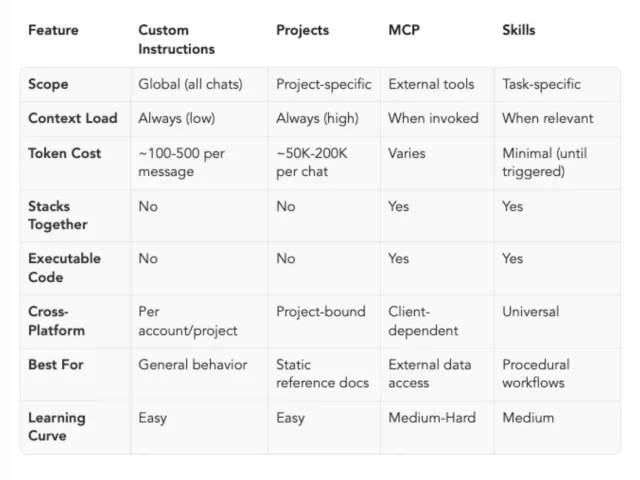
When to Use What: A Decision Framework
Here’s how I decide which tool to use:
Use Custom Instructions when:
-
You want consistent behavior across all conversations
-
The instruction is about how Claude communicates, not what it does
-
Example: “Always show code examples in TypeScript and Python”
Use Projects when:
-
You have a defined scope of work with static reference materials
-
You want team members to collaborate in a shared context
-
Example: “Product documentation project” with specs, user feedback, past features
Use MCP when:
-
You need real-time data from external systems
-
You want Claude to take actions in other tools
-
Example: Connecting to your Notion workspace to read and update pages
Use Skills when:
-
You have specialized workflows that require specific procedures
-
You need executable code for deterministic operations
-
You want automatic skill composition for complex tasks
-
Example: “Financial modeling following our company’s DCF methodology”
Use combinations when:
-
Complex workflows: MCP + Skills (data access + procedural knowledge)
-
Team standardization: Projects + Skills (shared context + reusable procedures)
-
Personal optimization: Custom Instructions + Skills (behavioral preferences + task expertise)
Which MCP servers are best for Claude?
The best MCP server is the one for a system you already use every day. Five good places to start:
- Code and issues: the GitHub MCP server, to read issues, review pull requests and open new ones.
- Local files: the filesystem reference server, to let Claude read and write inside folders you choose.
- The browser: Playwright MCP, to have Claude open pages, click through a flow and check what it sees.
- Documents: Notion's MCP server, to read and update pages your team already keeps.
- Production errors: Sentry's MCP server, to pull an error, its stack trace and its history into the conversation.
Pair any of them with a Skill once you notice yourself giving Claude the same instructions twice. To expose a system of your own, how to build an MCP server walks through one in Python.
Claude Skills vs MCP: common questions
What is Claude MCP? Claude MCP means Claude connected to servers that speak the Model Context Protocol, the open standard Anthropic released in November 2024. Each MCP server exposes tools, resources or prompts from another system, such as GitHub, a database or Notion, so Claude can read live data and take actions there.
Are Claude Skills the same as MCP servers? No. A Skill is a folder of instructions, with optional scripts, that teaches Claude a procedure and loads only when a task matches it. An MCP server is a running process that gives Claude access to an external system. Skills change what Claude knows; MCP servers change what it can reach.
Claude Skills vs MCP: which should I use? Ask what Claude is missing. If it is a method you could write down for a new hire, write a Skill. If it is data or an action in another system, connect an MCP server. Most real workflows need both: the server fetches the data, and the Skill says what to do with it.
Can a Claude Skill use an MCP server? Yes. A Skill's instructions can tell Claude which MCP tools to call, in what order and how to handle the results. For example, a triage Skill can use a GitHub MCP server to read new issues, then label and summarise them the way your team does. That pairing is how the two are meant to work together.
What are the best Claude MCP servers to start with? Start with the systems you already work in. Good first servers are GitHub for code and issues, a filesystem server for local files, Playwright for driving a browser, Notion for documents, and Sentry for production errors. Connect one, try a real task, and add a Skill once you repeat the same steps.
What's next
To build your own, Getting Started with Claude Skills goes from a first Skill to scripts, real use cases and common pitfalls, and the 5 Claude Code skills I kept shows which published ones earn their place. For the access side, What is Claude MCP covers adding and configuring servers in Claude Code, Claude Desktop and Claude.ai.
Want to enable Skills? In Claude.ai, open your settings, choose Customize, then Skills. Skills need code execution enabled. As of September 2026, Anthropic lists them as available on the Free, Pro, Max, Team and Enterprise plans, in Claude Code and through the API; see What are skills? in the Claude Help Center.